Live demo · stablecoin-demo.mikodes.com

Your own stablecoin checkout. A fee on every payment.

Onboard merchants, set each one's fee in basis points and collect it on-chain inside the customer's own payment. The rest goes straight to the merchant's wallet — you never hold customer funds.

A labelled DEMO store on Solana devnet with test tokens. Hosted on a MIKODES machine, so it is sometimes offline.

  • Stablecoin payments
  • source code
  • non-custodial
  • 16 docs pages
stablecoin-demo.mikodes.com
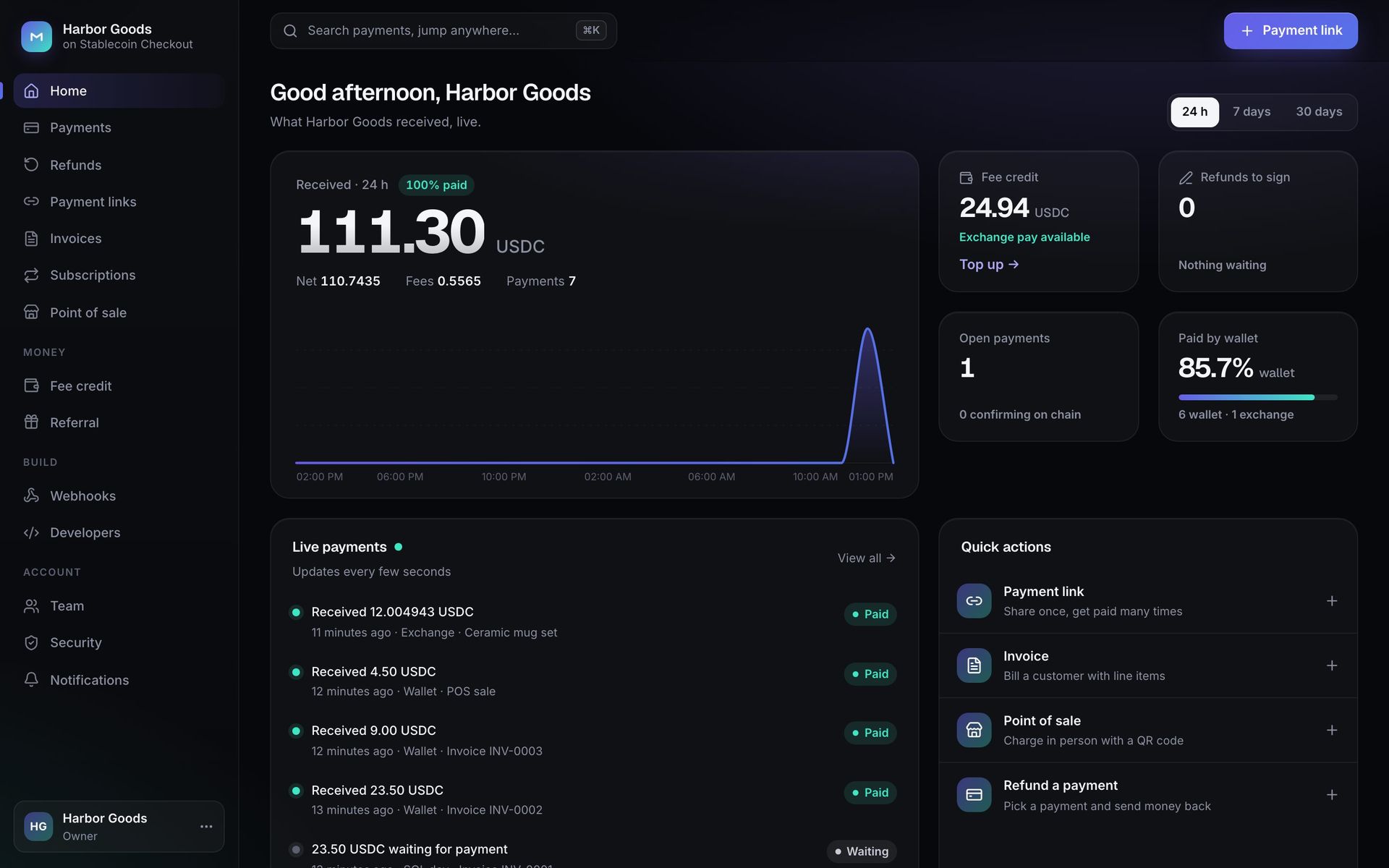
Merchant portal home for the test merchant Harbor Goods: 111.30 USDC received in 24 h, fees, fee credit, live payments and quick actions
Revenue calculatorWhat could it earn you?Your users, volume and fee — the caps come from the code.Revenue calculator →
fee hard cap in code (ships at 0)≤ 10%
9:41
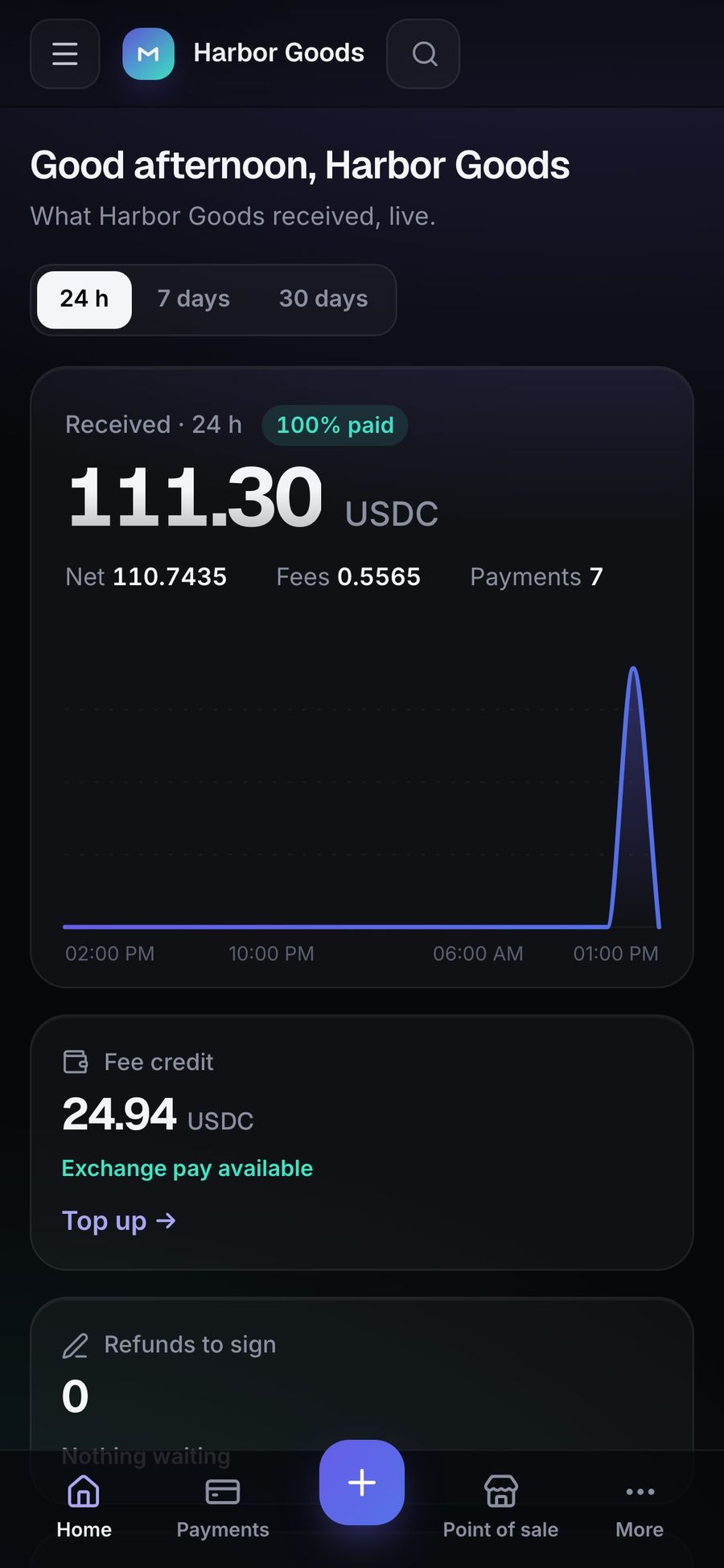
Merchant portal on a phone: received today and live payments
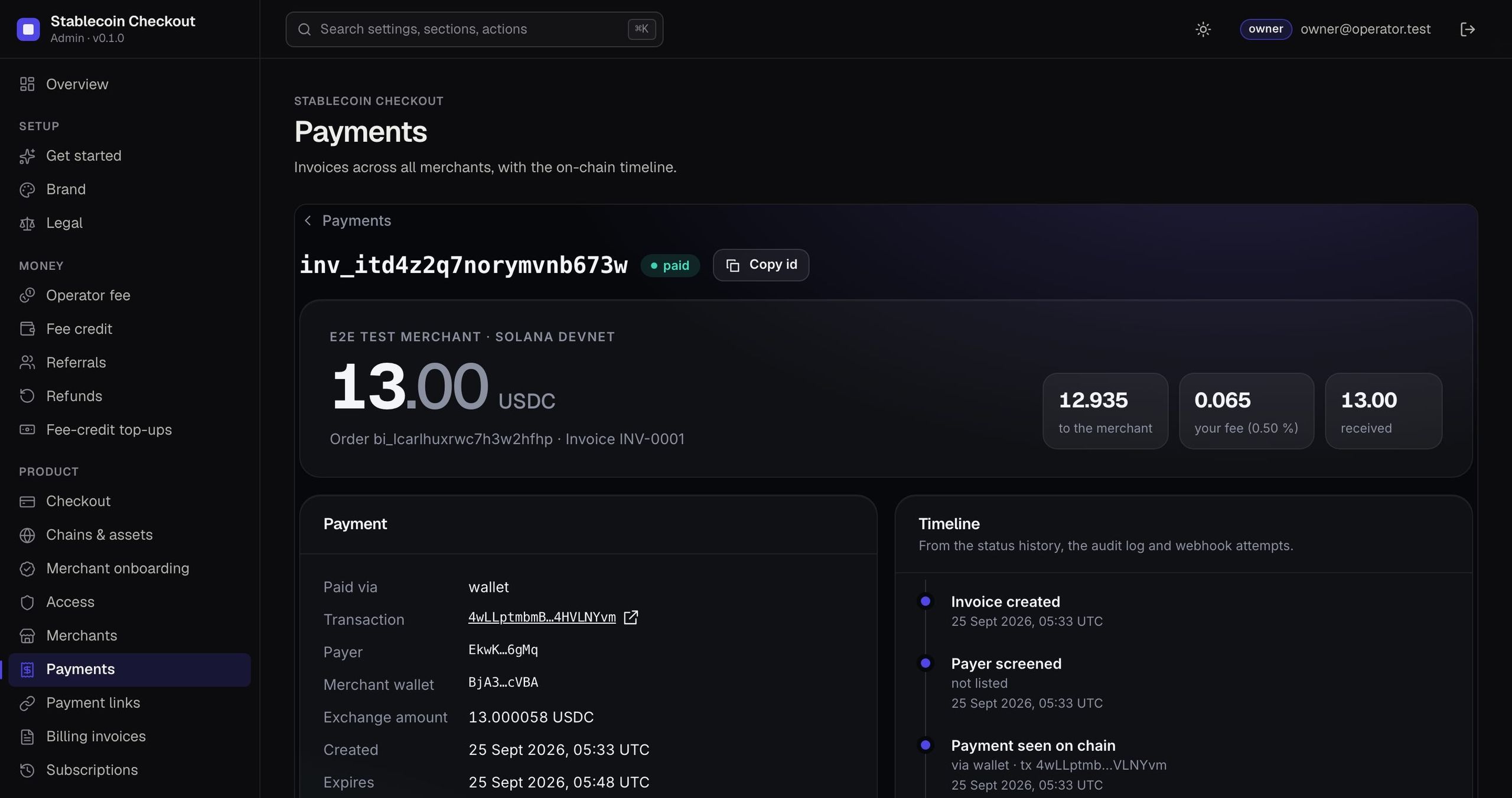
stablecoin-demo.mikodes.com/admin · devnet
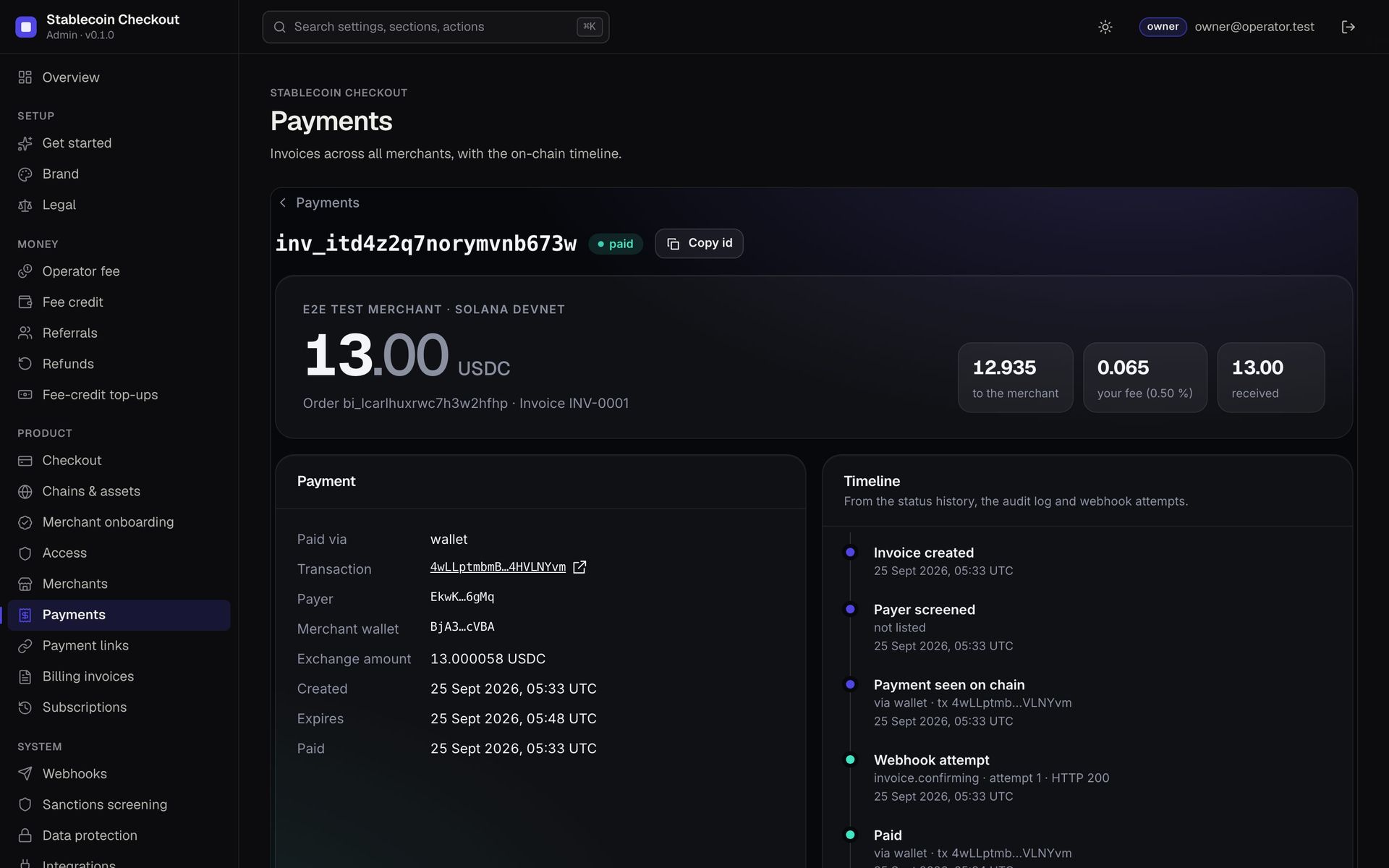
Stablecoin Checkout operator console, payment detail: the invoice id, the amount in USDC with the merchant split, the payment panel with wallet, transaction, payer and exchange amount, and the timeline from invoice created through payer screened, payment seen on chain, webhook attempt and paid.
The operator console on devnet. The timeline is the product's audit trail for one test invoice.

Built on

  • Solana
  • Base
  • USDC
  • USDT
  • Solana
  • Base
  • USDC
  • USDT
  • Solana
  • Base
  • USDC
  • USDT
  • Solana
  • Base
  • USDC
  • USDT
  1. Onboardmerchants sign up; you approve and set their fee
  2. Invoicepayment links, invoices, POS QR or the API
  3. Customer paysfrom a wallet or an exchange withdrawal
  4. Fee landsin the same transaction, or from prepaid credit

Business plan

A stablecoin payment processor.
A fee on every payment.

Buy the source code once. Run it under your brand. The revenue lines are already in the code — they pay you, not us.

  1. 01Buy the sourceCheckout, merchant portal, operator console, contracts.
  2. 02Brand itYour name; a fee per merchant in basis points.
  3. 03LaunchHost the checkout; onboard your first merchants.
  4. 04GrowEvery merchant you add pays on every payment.

Who runs it

  • Agencies serving online shops
  • Payment resellers in crypto-friendly markets
  • Platforms paying out to many sellers

Where the money comes from

  • Payment feesArrives in the customer's own transaction

Running costs One server and RPC access.

Earnings calculator

What could Stablecoin Checkout
earn you?

Move the sliders. Caps come from the code; prices and traffic are yours to set.

Realistic example · revenue per month

—

— per year

  • Payment fees
Est. running cost—
Left for you / month—

Example scenarios, not a forecast or a promise. Revenue depends on the merchants you sign and their volume. Network fees, exchange fees and taxes are not included.

For the operator

You run the checkout.
Every payment pays you.

  • Set a fee per merchant from 0 to 1,000 bps (up to 10%)
  • Wallet pay: your fee arrives in the customer's own transaction
  • Exchange pay: merchants prepay fee credit you keep as revenue
  • Ships keyless, fee hook empty — MIKODES takes no cut
≤ 10%fee hard cap in code (ships at 0)
0private keys or seeds on the server
stablecoin-demo.mikodes.com
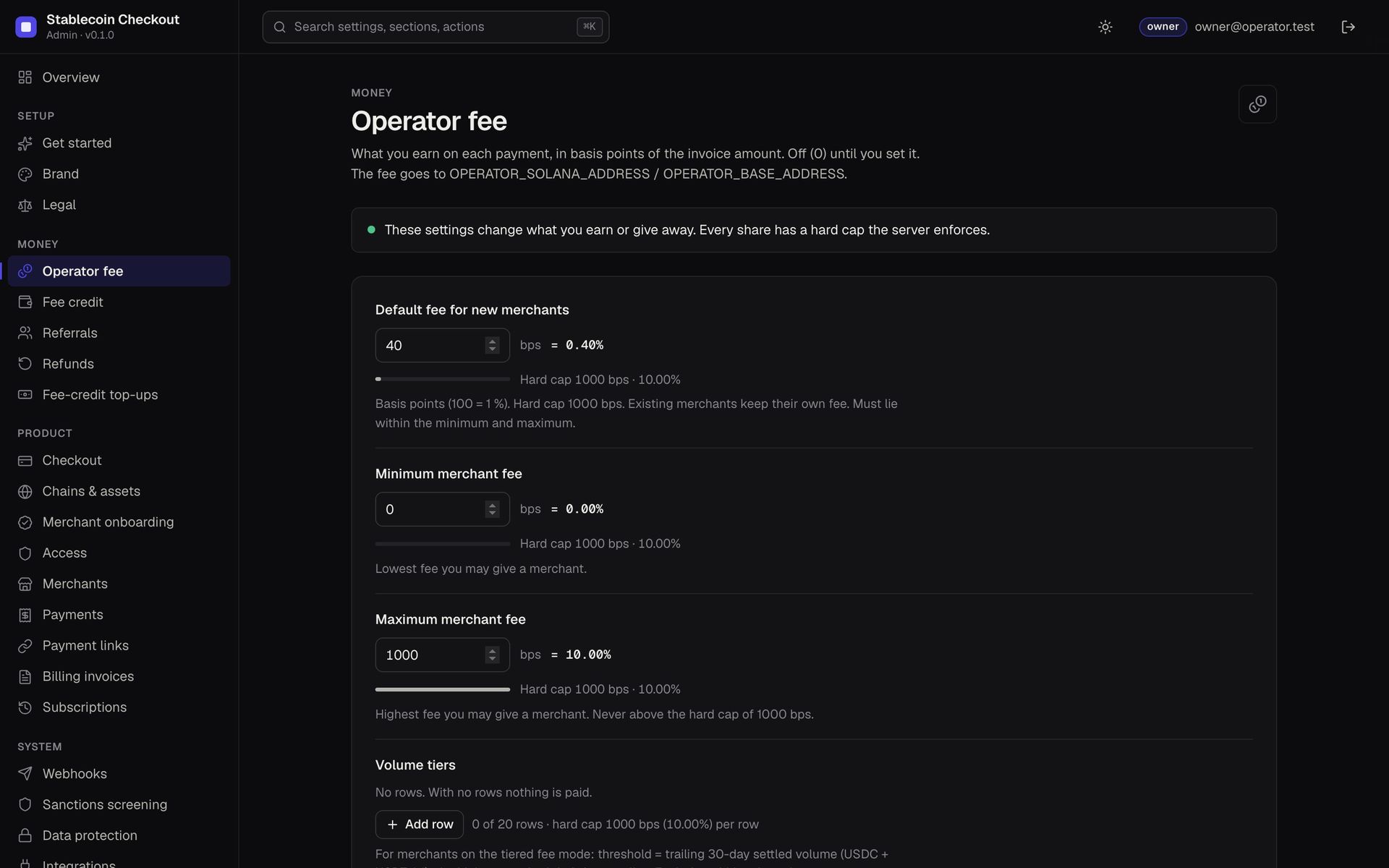
Operator fee settings: default fee 40 bps, minimum and maximum merchant fee, hard cap 1000 bps
Operator console →

What it does

One transaction pays two wallets.
Neither of them is yours to hold.

Customer wallet100.00 USDC
Merchant99.5%99.50
Your fee50 bps0.50

Wallet pay: atomic split

Built in the payer's browser, signed in their wallet: merchant gets amount − fee, you get the fee. Both transfers settle together or neither does.

The server never builds, signs or submits a transaction
Merchant prepays fee credit50 USDC
Customer sends 100.003714
Matched on-chain · fee debited

Exchange pay: unique amount

Customers withdraw from Binance, OKX or Bybit. A unique amount identifies the order; your fee is debited from the merchant's prepaid credit.

No credit, no exchange pay — wallet pay keeps working
12.00 USDCExchange · Ceramic mug setpaid
4.50 USDCWallet · POS salepaid
23.50 USDCInvoice INV-0001waiting

Merchant portal

Payments, refunds, payment links, invoices, subscriptions and point of sale, fee credit, webhooks, team and two-factor — for every merchant.

Real screens from a devnet run
Default fee40 bps in the demo
hard cap 1000 bpsper merchant

Operator console

Fees per merchant with hard caps, fee credit, referrals, refunds, chains, sanctions screening, revenue with a reference for every line.

MIKODES Admin Kit · audit log · rollback
Invoice created
Payment seen on chain
Webhook · HTTP 200attempt 1

Signed webhooks

HMAC-SHA256 signature, idempotent event IDs, up to 8 attempts with backoff, then a dead-letter state. Every attempt is recorded.

SSRF-safe delivery · private IPs refused
Pay any amountUSDC · Solana
Continue to paymentEN / SK
PhantomSolflareBinanceOKXBybitstatus page

Checkout your merchants' customers see

Exact amount, QR, per-exchange guidance, live confirmation and a public status page with on-chain evidence. SK/EN, light and dark.

Underpaid and overpaid go to review, never auto-paid

Illustrations of built features, with amounts from a devnet test run. The demo shows the real screens.

The rest of the product

What you cannot see from the front.
Where the fee is set, how a payer with no wallet pays, and how a payment ends.

The checkout is the part a payer sees. These are the operator's cut, the path for a payer who has no browser wallet, a link that is no longer valid, and the receipt.

What does the operator side look like?

stablecoin-demo.mikodes.com/admin · devnet
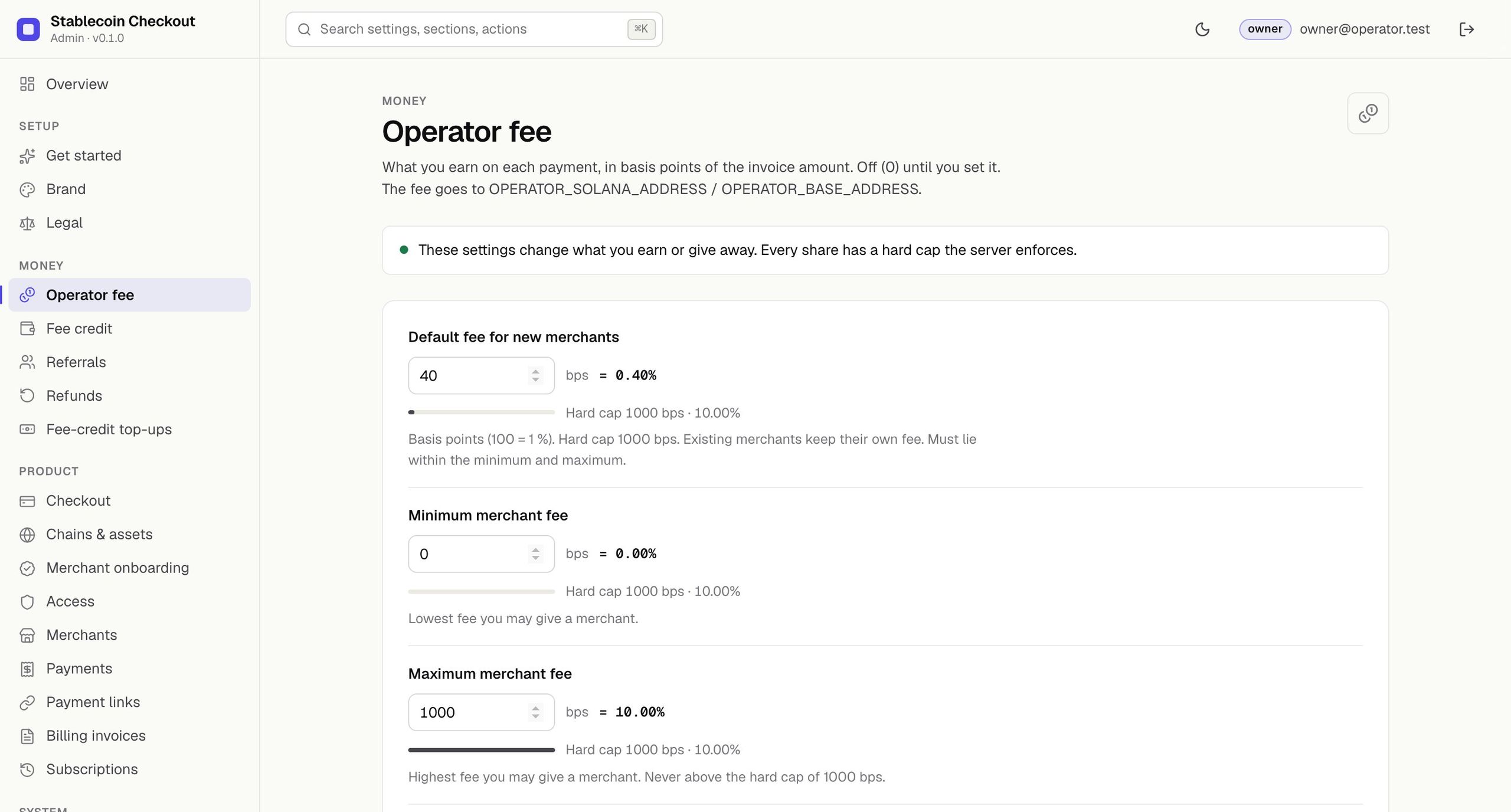
Stablecoin Checkout operator console, Operator fee: a default fee for new merchants in basis points, a minimum and a maximum fee, each with the hard cap the server enforces, and volume tiers that can lower the fee as a merchant grows.
Where the operator's cut is set. The panel says the fee is off until it is set and names the cap on every field.

What does a payer do when there is no wallet in the browser?

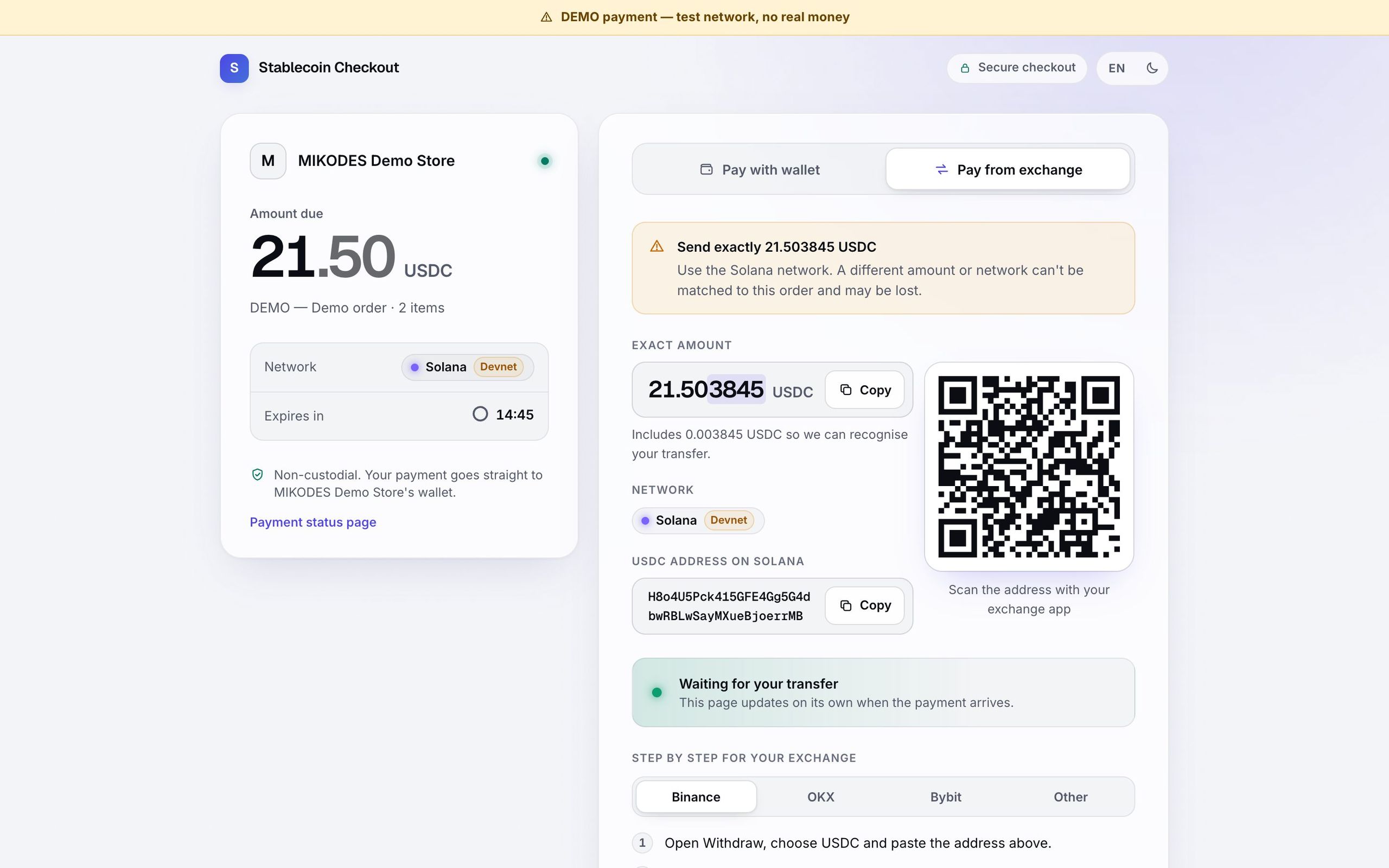
stablecoin-demo.mikodes.com/demo · devnet
Stablecoin Checkout, Pay from exchange: an exact amount to send that is a few fractions above the invoice total so the transfer can be matched to this order, the receiving address with a copy action, a warning that a different amount or the wrong network cannot be matched and may be lost, tabs for Binance, OKX, Bybit and Other, and step-by-step withdrawal instructions that say to choose the Solana SPL network and withdraw on-chain only.
The path for a payer who holds funds on an exchange rather than in a browser wallet. The unique amount is how the payment is matched; the page says what happens if it is wrong.

What happens when something goes wrong?

stablecoin-demo.mikodes.com/pay · devnet
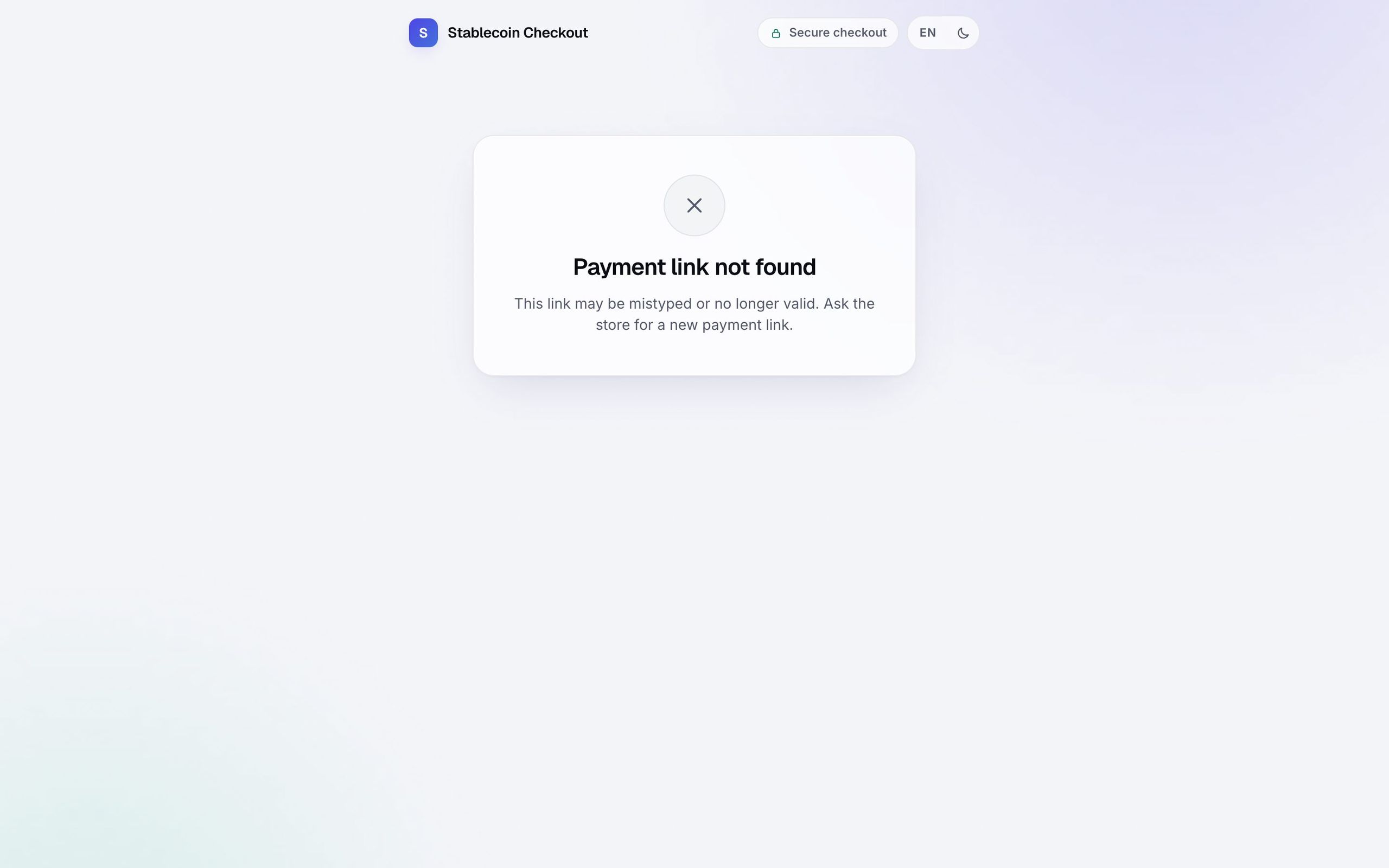
Stablecoin Checkout opened on a payment link that does not exist: a Payment link not found panel saying the link may be mistyped or no longer valid and to ask the store for a new one, with no order details, no amount and nothing else leaked about the shop.
A bad or expired link is a dead end that tells the visitor nothing about the merchant, the order or any other invoice.

How does a payment end?

stablecoin-demo.mikodes.com/demo · devnet
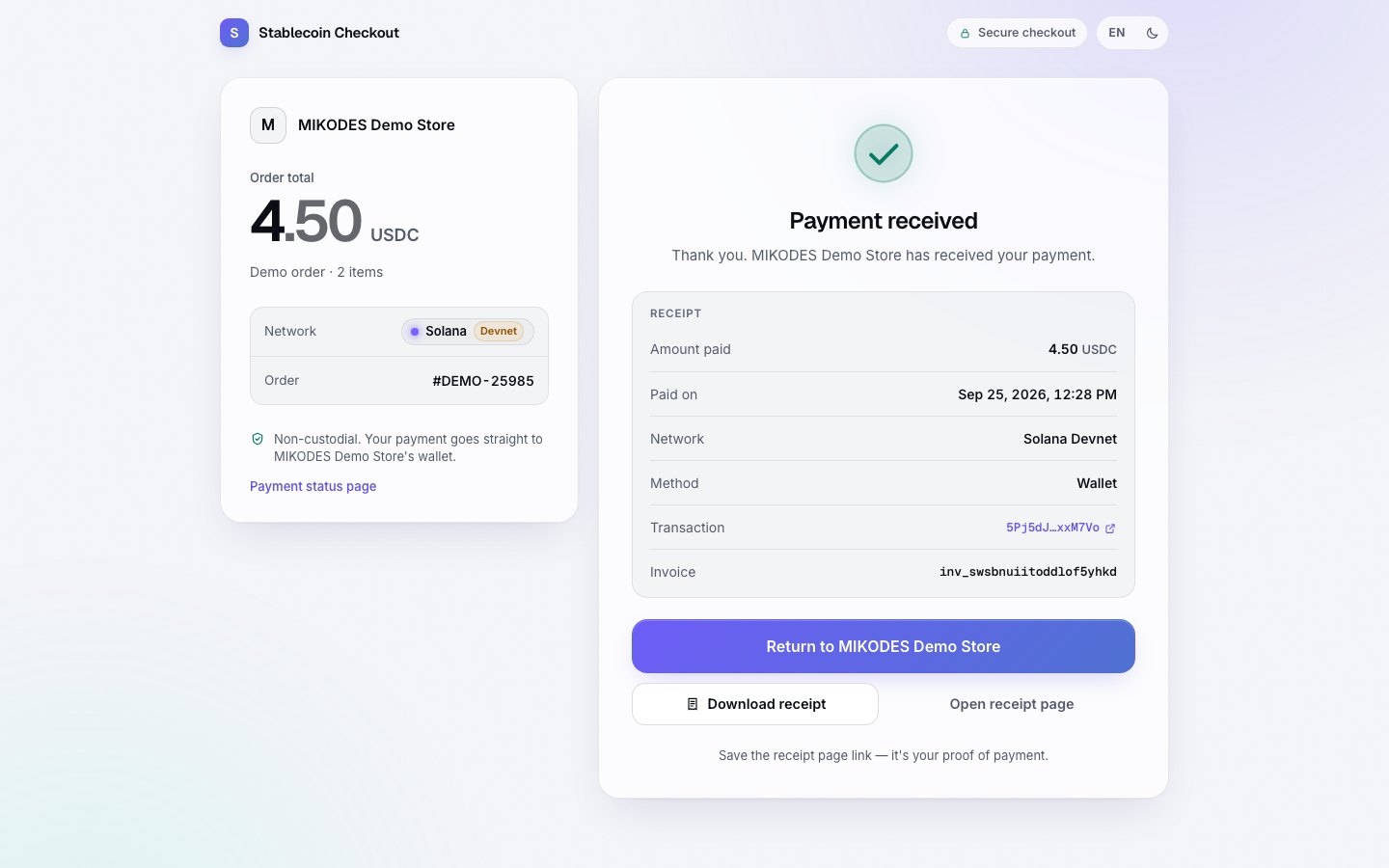
Stablecoin Checkout after a payment: a Payment received panel with the amount, the date, the network, the method, the transaction link and the invoice id, a Download receipt action and a note that the receipt page is the proof.
The end of the buyer's path on devnet, with the transaction link and the invoice the merchant keeps.

What does it look like on a phone?

9:41
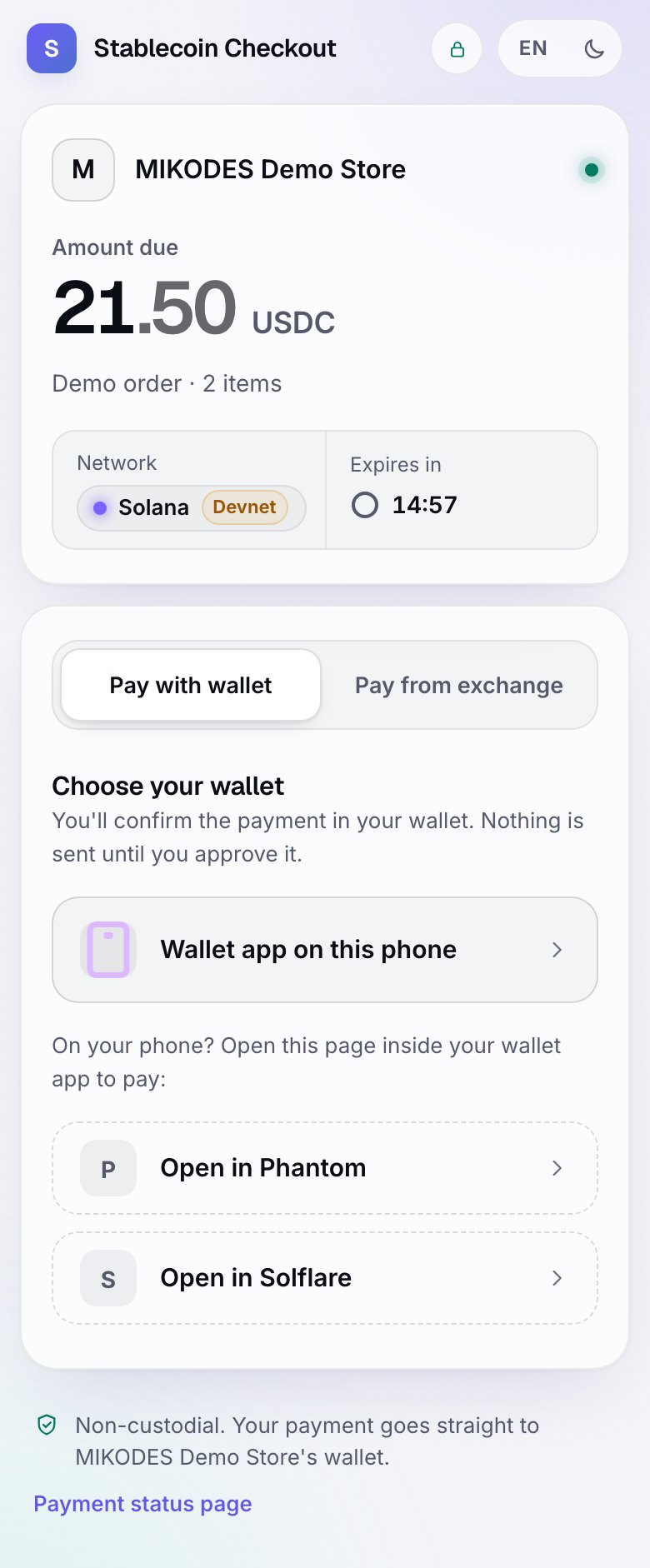
Paying from a wallet on a phone: the invoice, the amount and the network
Pay by wallet
9:41
Paying from an exchange on a phone: the address, the memo and the exact amount
Pay from an exchange
9:41
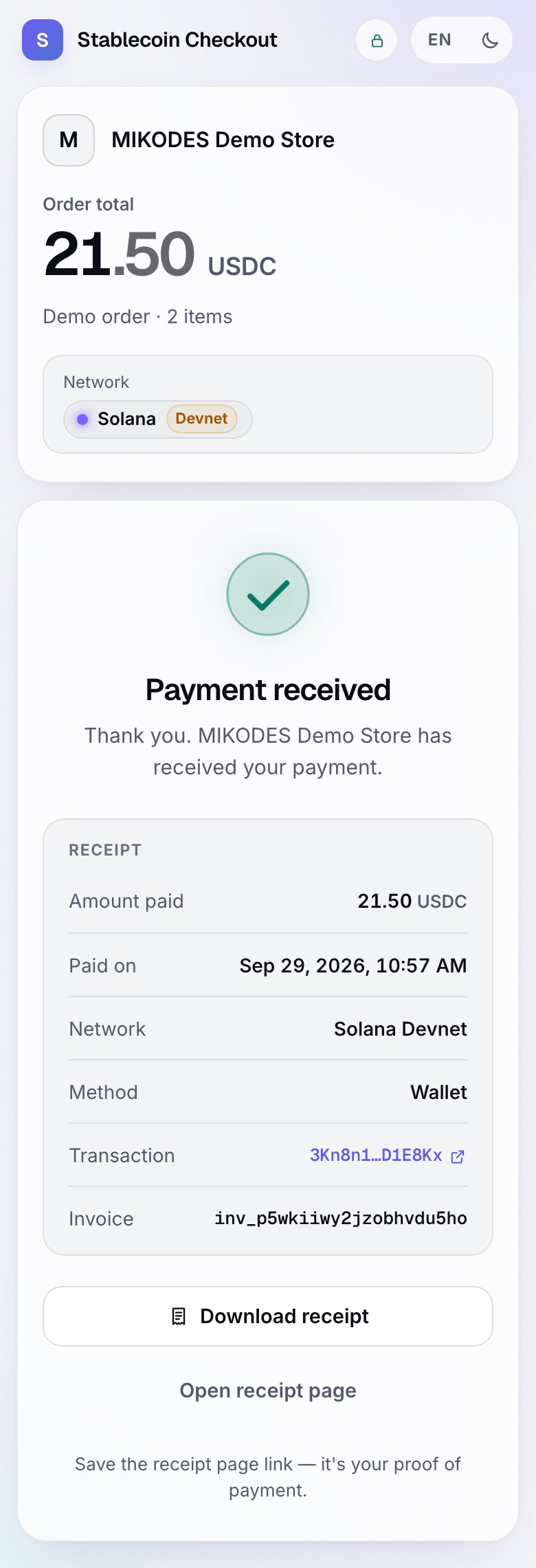
The receipt on a phone after the payment confirms
The receipt
The payer's three screens on devnet. Payment goes straight to the merchant's wallet.

Interactive tour

See every screen.
Then try it live.

Real screens from the product. Click a screen to enlarge it.

stablecoin-demo.mikodes.com
Merchant portal home for the test merchant Harbor Goods: 111.30 USDC received in 24 h, fees, fee credit, live payments and quick actions
9:41
Merchant portal on a phone: received today and live payments
stablecoin-demo.mikodes.com
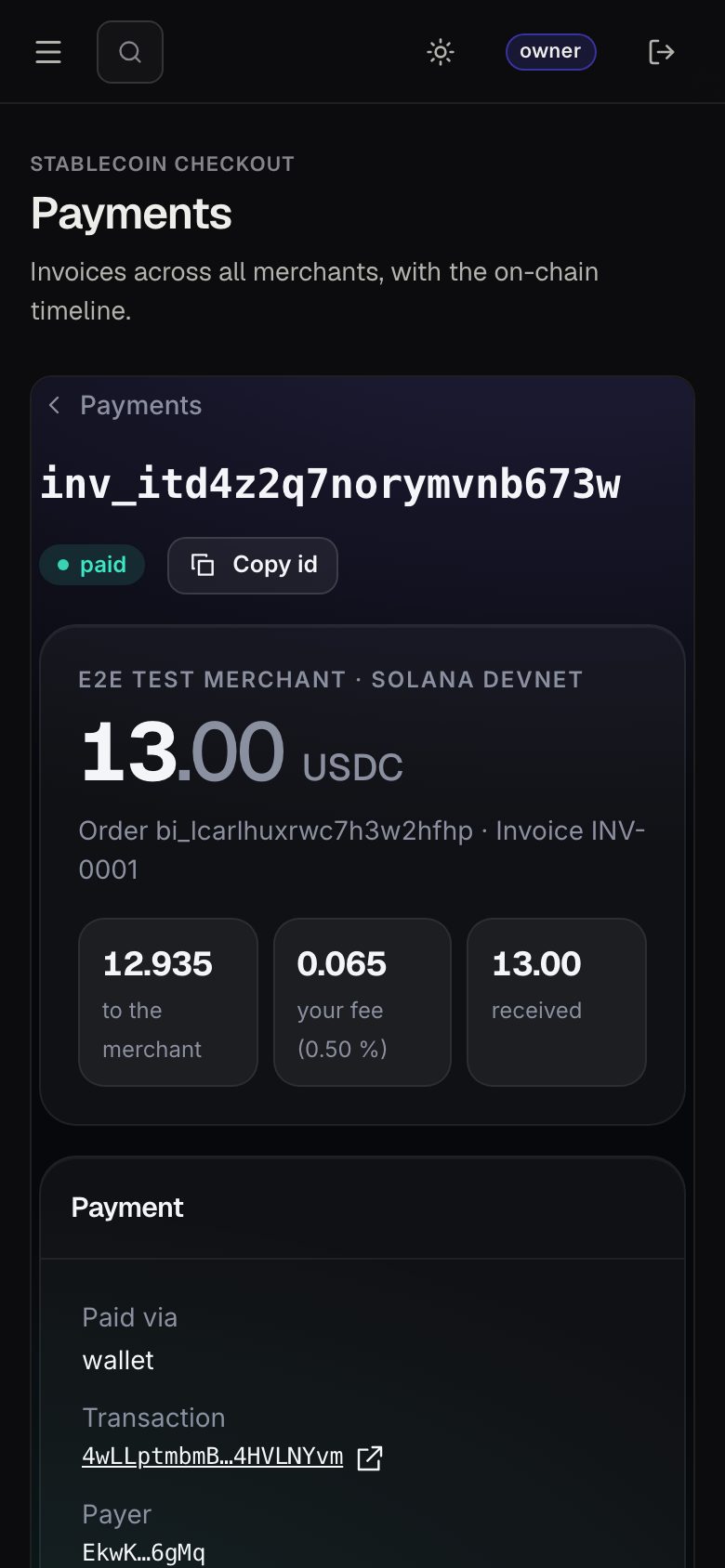
Operator payment detail: 13.00 USDC paid, 12.935 to the merchant, 0.065 operator fee at 0.50%, payment fields and the on-chain timeline
9:41
Operator payment detail: 13.00 USDC paid, 12.935 to the merchant, 0.065 operator fee at 0.50%, payment fields and the on-chain timeline
Stablecoin Checkout operator console, Operator fee: a default fee for new merchants in basis points, a minimum and a maximum fee, each with the hard cap the server enforces, and volume tiers that can lower the fee as a merchant grows.
stablecoin-demo.mikodes.com
Stablecoin Checkout, Pay from exchange: an exact amount to send that is a few fractions above the invoice total so the transfer can be matched to this order, the receiving address with a copy action, a warning that a different amount or the wrong network cannot be matched and may be lost, tabs for Binance, OKX, Bybit and Other, and step-by-step withdrawal instructions that say to choose the Solana SPL network and withdraw on-chain only.
stablecoin-demo.mikodes.com
Stablecoin Checkout opened on a payment link that does not exist: a Payment link not found panel saying the link may be mistyped or no longer valid and to ask the store for a new one, with no order details, no amount and nothing else leaked about the shop.
stablecoin-demo.mikodes.com
Stablecoin Checkout after a payment: a Payment received panel with the amount, the date, the network, the method, the transaction link and the invoice id, a Download receipt action and a note that the receipt page is the proof.
9:41
Paying from a wallet on a phone: the invoice, the amount and the network
9:41
Paying from an exchange on a phone: the address, the memo and the exact amount
9:41
The receipt on a phone after the payment confirms
stablecoin-demo.mikodes.com
Operator fee settings: default fee 40 bps, minimum and maximum merchant fee, hard cap 1000 bps

Every payment shows who got what.

To the merchant, your fee, the transaction, and the timeline from invoice to webhook.

stablecoin-demo.mikodes.com
Operator payment detail: 13.00 USDC paid, 12.935 to the merchant, 0.065 operator fee at 0.50%, payment fields and the on-chain timeline
9:41
Operator payment detail: 13.00 USDC paid, 12.935 to the merchant, 0.065 operator fee at 0.50%, payment fields and the on-chain timeline
Open it live →

Operator console

You are the payment provider.
This is your console.

Sign in to the live console and look around before you buy. It is the same console that ships in the source.

MoneyEach merchant's fee in basis points, fee credit and referrals — collected inside the payment, never held by you.
MerchantsOnboarding, checkout settings, which chains you accept and who gets access.
RevenueRealised payments with an on-chain reference, plus the chain-watcher status behind them.
AuditWebhooks, sanctions screening, data protection, team, security and the audit log.

stablecoin-demo.mikodes.com/admin

This one is a read-only demo: it refuses every change in the server, so nothing you click can break it for the next visitor. On your own install the same screens write for real.

Built so the riskiest parts don't exist.

NON-CUSTODIALno balances, no escrow, no pooled wallets — funds land with the merchant
YOUR LICENCEwhether running it needs registration depends on where you operate
NO SERVER KEYSthe server only reads the chain through your own RPC

Sanctions screening hook, append-only audit log and redaction by default. Not legal advice.

Documentation

Installed in an afternoon.
Every step written down.

16 pages written from the real code — requirements, install, configuration, deployment, troubleshooting.

Documentation

Buy source code

Own Stablecoin Checkout.
Ship it as yours.

  • Full source code, yours to rebrand and run
  • Documentation — 16 pages, also online
  • A live demo to click through before you pay
  • Item support through CodeCanyon

Installation & customization

Want it installed on your servers, rebranded or extended? The team that built it does that — write to us.

Stablecoin Checkout · source code

Coming to CodeCanyon

The source code will be sold on CodeCanyon (Envato Market).

Pay the demo store yourself.

v0.1 · Solana devnet · Base router tested, not deployed · demo runs on a MIKODES machine and may be offline · not released yet

Installation & custom work

The download is not the end of it.
Tell us what you need.

The code is sold on CodeCanyon. The work around it — getting it live, changing it, or building you something of your own — is ours, and it starts as a conversation on Telegram, not a form.

Install it for me

You bought the code and you want it running, not a folder of files.

  • On your own servers, your domain, your keys
  • Your name and colours, not ours
  • Handed over working, with what we changed written down

Add features

Stablecoin Checkout plus the one thing it does not do yet.

  • A screen, a chain, a payment method, a report
  • Built into your copy, so updates still apply
  • We say up front if it is a bad idea

Build something custom

A product of your own, on foundations that already work.

  • Starts from what is proven here, not a blank page
  • Yours alone — we do not resell it
  • Same standard as the products on this page

MIKODES is a Slovak company and has been selling on CodeCanyon since April 2019. 17 products run in the open at mikodes.com — Solana, Hyperliquid, Base, Telegram and WordPress. Tell us what you need and we will tell you what it takes; we will also say when we are the wrong people for it.

Talk to us

Start the conversation.

Telegram is fastest and it reaches the person who built this, in English. Describe what you need and you get an honest answer about what it takes. The source code itself is sold on CodeCanyon.

Telegram · fastest

Talk on Telegram

E-mail

For installation and customization quotes.

Other MIKODES products

Also by MIKODES.

Live demoAdmin panelBuy