
Stablecoin Checkout
your own checkout, a fee on every payment.
Everything you need to install, configure, brand and run your own non-custodial stablecoin checkout for many merchants. Read it top to bottom the first time. After that, press / and search.
01What you bought
Stablecoin Checkout is self-hosted source code for a stablecoin payment service that you, the operator, run for many merchants. Merchants create invoices, payment links, billing invoices, subscriptions and point-of-sale charges; their customers pay in USDC or USDT; you set a platform fee in basis points for each merchant.
| Payment mode | How it works | How your fee arrives |
|---|---|---|
| Wallet pay (Phantom, Solflare, MetaMask …) | One transaction built in the payer's browser and signed in the payer's wallet. | Inside the same transaction: the merchant receives amount − fee, you receive fee. Both transfers settle together or neither does. |
| Exchange pay (withdrawal from Binance, OKX, Bybit …) | A plain transfer of a unique amount to the merchant's address. | Debited from the merchant's prepaid fee credit. At zero credit, exchange pay pauses for that merchant; wallet pay keeps working. |
The server stores no private key or seed phrase and never builds, signs, relays or submits a transaction. Payments go from the payer straight to the merchant and to you. The server only reads the chains through your own RPC endpoints.
Non-custodial design keeps you out of custody, but running a payment service may still be regulated where you operate. Take advice before you onboard real merchants. These docs are not legal advice.
02What is in the package
| Folder | What it is |
|---|---|
apps/server | The API (Fastify, Node.js), SQLite database, chain watcher, HMAC-signed webhooks, fee-credit ledger and the append-only, hash-chained audit log. It also serves the operator console at /admin and its product pages at /ops. |
apps/checkout | The payment page your merchants' customers see (/pay/:id), the public status page with on-chain evidence (/i/:id), payment links, billing invoices, subscriptions, merchant signup and a labelled DEMO store (/demo). Static files. |
apps/ops | Operator product pages (merchants, payments, links, billing, subscriptions, refunds, top-ups, webhook deliveries), shown inside the console. |
apps/portal | The merchant portal: payments, refunds, payment links, invoices, subscriptions, point of sale, fee credit, webhooks, developers, team, security, notifications, referral. |
apps/admin | The interim merchant portal that the shipped Caddy configuration still serves (merchants sign in with their API key). See Which portal. |
packages/core, packages/solana, packages/evm | Shared types and money math, Solana and Base adapters. |
contracts/evm | MikodesPayRouter.sol (Base wallet pay: no owner, holds nothing) and its deploy script. |
vendor/mikodes-admin | The MIKODES Admin Kit that renders the operator console. Do not edit it. |
deploy/ | Dockerfiles, Docker Compose, Caddyfile, systemd units, PM2 file, Vercel configs, demo reset, sanctions refresh. |
scripts/ | Setup, static build, backup, demo reset, licence report. |
docs/ | The technical reference that ships with the code (DEPLOY.md, OPERATIONS.md, CONTRACT.md, CONTRACT-ADMIN.md). |
A server with a persistent disk, domains, RPC endpoints from a provider you choose, your fee wallet addresses (public addresses only), and optionally an SMTP account and a Telegram bot. None of these are part of the purchase, and nothing in the repository contains a key, an RPC URL or a fee address.
03Pick your path
04Try it before you install
A public demo runs on Solana devnet with test tokens only:
- Demo store: stablecoin-demo.mikodes.com/demo. Add items and pay with a devnet wallet.
- Operator console: stablecoin-demo.mikodes.com/admin.
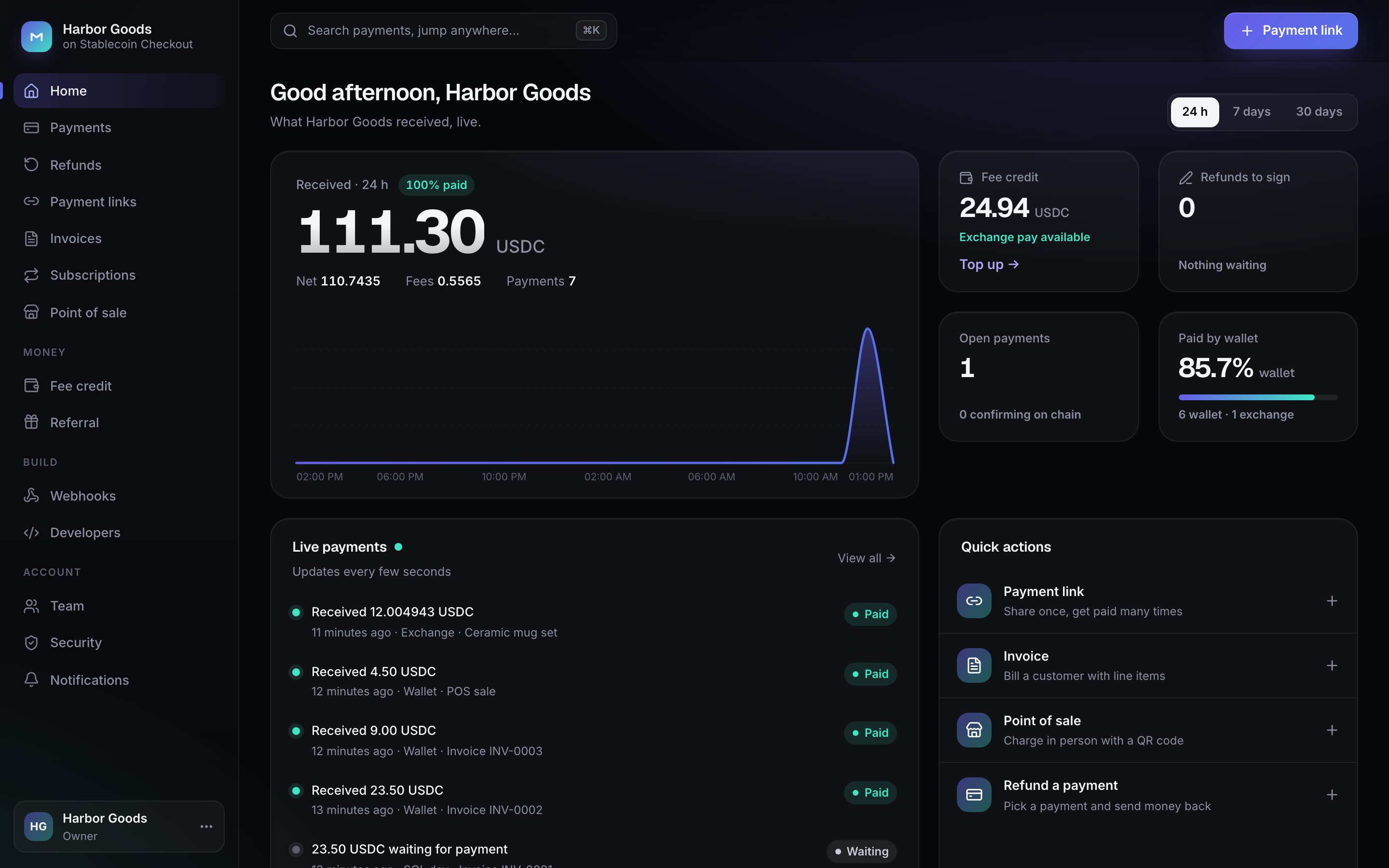
The demo is hosted on a MIKODES machine, so it is sometimes offline. Amounts in it and in these screenshots come from devnet test runs with test tokens; they are not results.
05How to read these docs
- Dark boxes are commands. Press Copy in the corner and paste them into a terminal.
- Grey text after
#is an explanation. The Copy button leaves it out. - Text in angle brackets, like
<your devnet address>, is a placeholder. Replace it, brackets included.pay.example.comandadmin.example.comstand for your own domains. - Commands run from the unzipped project folder unless a step says otherwise.
- Required marks settings you cannot skip. Not verified marks steps MIKODES has not run end to end; they are listed so you can test them first.
- The code also ships technical Markdown in
docs/. Where it and these pages differ, these pages follow the current code.